Home
Sit. Scan. Choose. Your order gets moving.
Lysara Self Order lets customers browse and order on their own phones, from QR menus in your outlet to pickup and delivery.
See it in a demo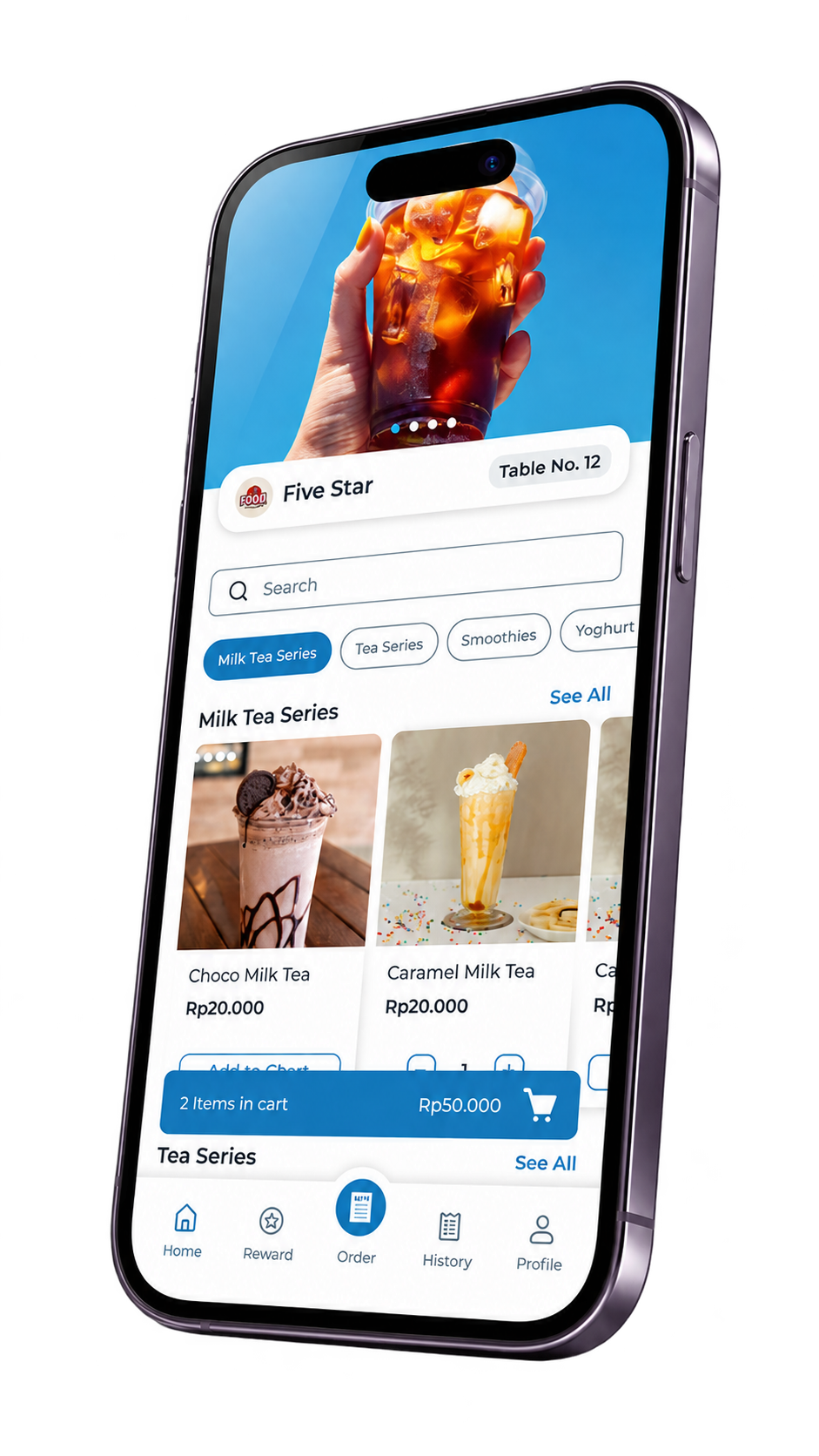
From scanning to receiving the order.
- Scan the outlet QR code
- Open and browse the menu
- Add products to the cart
- Continue with the order
- The outlet receives and fulfils the order
What is Self Order?
Self Order lets customers browse and select items on their own devices. Lysara provides this flow for businesses that want to offer more ways to order.
Checkout staff still have a role in service. Customers have space to browse while the outlet team fulfils orders according to its operations.
Customers are seated. The menu is on their phones.
In your outlet, customers scan a QR code, browse menu categories, and select products. The product view on this page shows categories, items, prices, and an order cart.
Plan where to place QR codes and help first-time customers understand the flow. In a demo, check both the customer experience and how your outlet receives orders.
Choose before reaching the outlet.
Self Order supports pickup and delivery options. Service settings and fulfilment follow your business operations; your team still needs to organise collection or delivery.
Discuss who prepares orders, how customers collect them, and how deliveries are fulfilled. A delivery option does not imply automatic integration with a particular delivery platform.
One product, a price for each way you sell.
Counter prices do not always match delivery prices. Sales Type supports product pricing and reporting by sales channel.
For example, a milk coffee could cost Rp25,000 for walk-in and Rp29,000 for delivery. These are illustrative Indonesian prices. Your business sets the actual prices. Setting sales types does not automatically connect orders to third-party delivery apps.
Explore Sales TypePayment completed. Funds go to your business account.
Lysara supports integration with the merchant’s own Xendit account. Payments are processed through that account and settled to the business bank account. Available methods, processing fees, and settlement schedules follow Xendit’s terms.
During outlet setup, discuss the payment methods you need and the merchant account you will use. Keep software subscription costs separate from payment processing costs in your monthly planning.
Explore paymentsA first order can start a relationship.
If you also need a customer programme, explore Lysara Membership for points, vouchers, and targeted offers. Review both products with the team so ordering and customer engagement fit your outlet.
Explore MembershipFrequently asked questions.
How do customers start ordering?
Customers scan an outlet QR code, open the menu on their phone, choose products, and follow your ordering flow.
Are pickup and delivery available?
Yes. Self Order supports both. Service settings and fulfilment follow your business operations.
Does this connect directly to delivery apps?
Check availability of synchronisation with specific platforms with the Lysara team. Sales Type channel pricing is a separate capability.